AI for Postcards: Why AI-Generated Artwork Fails Print Standards (And How to Fix It)
By Manny Torres · October 20, 2026
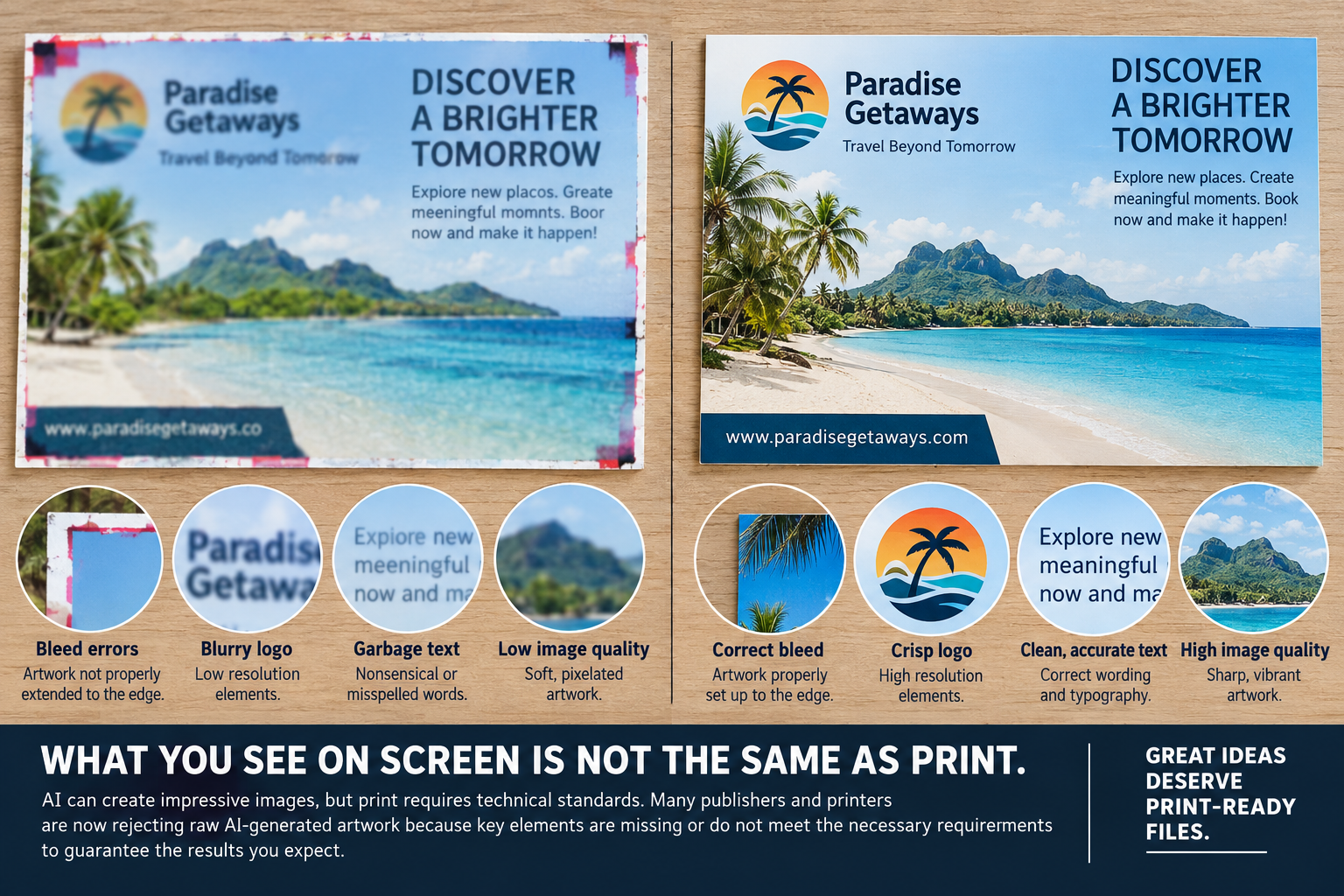
AI-generated postcard designs often fail at the print stage because they’re built for screens, not presses — missing bleed, running in RGB instead of CMYK, and sitting well under the 300 DPI resolution a 4×6 or 6×9 postcard needs to print sharp. The gap between a prompt result and a usable print file is the single biggest reason commercial printers bounce AI artwork back for revisions.
Why Do Printers Reject AI-Generated Postcard Artwork?
Printers reject AI-generated files most often because the image lacks the technical setup a press requires: no bleed allowance, incorrect color mode, low resolution, or fonts that aren’t embedded or outlined. The artwork can look perfect in a browser preview and still be unusable on a production line.
AI image generators are built to produce something visually convincing on a backlit screen. A screen displays color in RGB light and has no fixed physical dimension — it can scale infinitely without anyone noticing a loss in quality. A printing press works in exactly the opposite way: it reproduces ink in CMYK on a fixed sheet size, and it needs every pixel accounted for at full resolution. When those two systems meet, the mismatch shows up as:
- Color that shifts noticeably from the on-screen preview once converted to CMYK
- Text or logos that blur or pixelate because the file was generated at low resolution
- Design elements cut off at the edge because there’s no bleed margin
- Fonts that aren’t embedded, causing text to reflow or substitute on another machine
As an in-depth look at AI artwork for print explains, AI-generated images are typically optimized for digital display, not the technical standards print production depends on — which is exactly why a trained eye still needs to review the file before it goes to press.
What’s Missing From AI-Generated Files That Print Needs?
Most AI-generated artwork is missing four things a print-ready file requires: adequate resolution, CMYK color conversion, bleed and safe margins, and embedded or outlined fonts. Any one of these gaps can cause a reprint, a color mismatch, or a rejected order.
| Requirement | Typical AI-generated output | What print actually needs |
|---|---|---|
| Resolution | 72–150 DPI, optimized for screens | 300 DPI at final print size |
| Color mode | RGB (screen light) | CMYK (ink on paper) |
| Bleed | None — image ends at the visible edge | 0.125” extra on all sides |
| Fonts/text | Rasterized or editable but not embedded | Embedded or outlined in the final file |
| File format | JPEG or PNG | High-resolution, print-ready PDF |
Each row in that table represents a real failure point. A postcard with no bleed, for example, risks a thin white edge or a cropped headline the moment it’s trimmed to size — and that’s not a flaw in the press, it’s a flaw in the file.
How Is AI Graphic Design Different From Print-Ready Design?
AI graphic design generates a visual concept — a layout, a color palette, an image — but it doesn’t automatically account for the physical mechanics of printing. Print-ready design takes that concept and rebuilds it to the technical spec a press requires: correct color profile, exact trim size, bleed, and font handling.
Think of AI as the fast way to get to a strong creative direction. It can produce ten postcard concepts in the time a designer sketches one. But a creative direction and a production file are not the same deliverable. A designer (or a prepress team) still needs to:
- Rebuild or upscale the image at full resolution for the final postcard size
- Convert the color space from RGB to CMYK and proof for shifts, especially in blues, greens, and skin tones
- Add bleed and confirm safe margins so nothing critical sits too close to the trim line
- Set the file up as layered, editable source files where possible — not a flattened screenshot
“We’re seeing more files land on our prepress desk that look flawless on a monitor and then fall apart the moment we check the color separations,” says Manny Torres, CEO of 360 Print Studio. “Nine times out of ten it’s an AI-generated image that was never built past 150 DPI. It’s an easy fix if we catch it early — it’s a very expensive one if it goes to press first.”
That early catch is the real value a print partner adds. It’s also why ordering postcards directly from the postcards product page, where file specs and proofing are built into the process, tends to save a revision round compared to uploading a raw AI export and hoping for the best.
What Should Realtors and Agencies Know About AI Artwork for Postcards?
Realtors and marketing agencies are some of the heaviest postcard users, and they’re also among the most likely to reach for AI tools to draft a listing announcement or just-sold card quickly. The risk is that a client-facing mailer with a soft headshot, a muddy brand color, or a cropped logo reflects directly on the agent’s credibility, not just the printer’s.
A listing postcard usually has very little room for error: the property photo, the agent’s headshot, the brokerage logo, and a call to action all need to read clearly at arm’s length from a mailbox. Realtor graphic design for print specifically accounts for things AI tools don’t prioritize — brand consistency across a whole campaign, legible contact information at small sizes, and compliance with mailing formats set by the United States Postal Service. If you’re building a recurring mail campaign, it’s also worth reading how a just-listed and just-sold postcard campaign gets timed around a closing, since the file prep matters less if the mail timing is off.
Agencies and print resellers managing this at volume for multiple clients face the same issue multiplied — one AI-drafted template with a resolution problem can turn into a hundred rejected files across a client roster. That’s one reason more print shop and agency partners are building a prepress review step into their AI workflow rather than skipping it, a shift worth mapping out before you hand more of the process to automation.
How Do You Turn AI-Generated Art Into Print-Ready Postcard Files?
You turn AI-generated art into a print-ready file by upscaling to 300 DPI at final size, converting color from RGB to CMYK, adding 0.125” of bleed, and either embedding fonts or outlining any live text. Running a hard proof against the actual card stock before a full run catches anything the screen can’t show you.
A reliable sequence looks like this:
- Start with the AI output as a concept, not a final. Treat it as a creative reference for layout and color direction.
- Rebuild at full resolution. Many AI platforms can regenerate or upscale at a higher setting — confirm it hits 300 DPI at the postcard’s actual trim size, whether that’s 4×6 or 6×9.
- Convert to CMYK early, not at the last step, so you can actually see how the color shifts before you commit to a quantity.
- Add bleed and check safe margins against the specific postcard template you’re printing to.
- Choose the stock. A heavier card like 16PT card stock holds ink density and a UV gloss coating more evenly than a flimsier sheet, which matters more with AI-generated imagery since color accuracy is already a bigger variable.
- Proof before the full run. A digital preview and a printed proof are not the same thing — screen color and paper color are two different languages.
A run of 1,000 postcards at 4×6, printed both sides with UV gloss, currently costs $87.01 , and the larger 6×9 format at the same quantity runs $185.73 . Either size can absorb a properly prepared AI-assisted design without issue — the file prep is what determines the outcome, not the tool that drafted the concept.
1,000 postcards · 4×6 · printed both sides, UV gloss $87.01 Configure & order →What Does a Print-Ready Postcard File Checklist Look Like?
A print-ready postcard file has five non-negotiables: 300 DPI resolution at final size, CMYK color mode, 0.125” bleed with safe margins respected, embedded or outlined fonts, and a high-resolution PDF export. Missing any one of these is the most common reason a file bounces back before a run can start.
Run through it before you submit anything, AI-assisted or not:
- Resolution confirmed at 300 DPI at the actual postcard size (not scaled up after the fact)
- Color mode converted to CMYK and proofed against expected shifts
- 0.125” bleed added on all sides, with text and logos kept inside the safe margin
- Fonts embedded or converted to outlines
- File exported as a high-resolution, print-ready PDF
If a design was drafted with AI and hasn’t gone through this list, it’s a draft, not a production file — no different than a rough sketch that still needs a designer’s pass. The postcards order page walks through the exact size and bleed specs for every format so the file matches the press setup from the start, which is often the fastest way to avoid a second round entirely.
For smaller test runs — say, sampling a new AI-assisted design before committing to a full mailing list — 500 postcards at 6×9 with double-sided UV gloss currently runs $147.27 , giving you a real printed proof in hand before scaling up the order.
AI is a legitimate starting point for postcard concepts — fast drafts, color exploration, layout ideas. But the file that actually goes on press still needs to meet the same technical standards it always has. Closing that gap before you submit an order is less expensive, and far less frustrating, than closing it after a batch comes back wrong.
Ready to order premium postcards?
Get instant pricing →Frequently Asked Questions
Can I print a postcard directly from an AI image generator?
Usually not without edits. Most AI tools output low-resolution RGB images with no bleed or safe margins, which causes blurry text, color shifts, and cropped elements once a print shop sets up the 4×6 or 6×9 postcard file.
What resolution do AI-generated images need to be for postcard printing?
Print files need at least 300 DPI at final size. Many AI generators output images around 72-150 DPI, which looks sharp on a screen but prints soft or pixelated at postcard dimensions.
Why do postcards need bleed if the design looks complete on screen?
Printers trim every sheet after printing, and a small shift during cutting is normal. Without an extra 0.125 inch of bleed extending past the edge, trimming can expose thin white slivers or cut into text.
Is AI-generated artwork good enough for client-facing print like realtor postcards?
It can work as a starting concept, but client-facing print usually needs a designer to correct color mode, typography, and file structure so the postcard matches the brand and prints consistently.
What file format should I submit for postcard printing?
A high-resolution, print-ready PDF with embedded fonts and CMYK color is the standard most commercial printers request, including for postcard orders.
Does AI graphic design replace the need for a human designer in print projects?
Not yet for production-ready files. AI speeds up concepting and drafts, but a designer or prepress technician typically still needs to prepare the file for bleed, color accuracy, and resolution before it's sent to print.