Brochure Design Tips for Small Business Owners (That Actually Work)
By 360 Print Studio · May 13, 2026
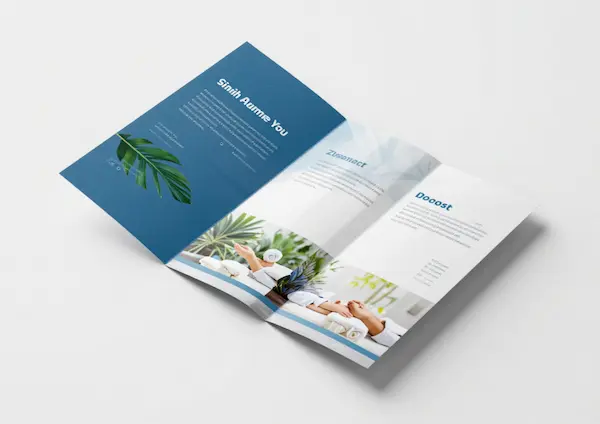
A well-designed brochure is one of the highest-ROI marketing materials a small business can produce. Unlike digital ads that disappear in seconds, a brochure sits on a counter, gets picked up by prospects, and physically represents your brand — sometimes weeks or months after you distributed it.
This guide covers the practical decisions that determine whether your brochure works as a sales tool or ends up in recycling.
Choose the Right Fold First
The fold type defines everything about your brochure — how many panels you have, how readers navigate it, and where it can be distributed.
Tri-fold (Letter Fold) — The most common business brochure. Creates 6 panels from a single 8.5×11 sheet. Fits in standard display racks, envelopes, and jacket pockets. Ideal for product overviews, service menus, and introductory materials.
Bi-fold (Half Fold) — Folds the sheet in half to create 4 panels. Best for menus, event programs, and content-heavy presentations where larger images are important.
Z-fold — Creates an accordion-like fold visible from both sides. Useful for step-by-step processes or sequential content where each panel tells part of a story.
Gate fold — Two outer panels open like doors to reveal a full inner spread. Creates a dramatic reveal effect; ideal for high-end real estate, luxury products, or event invitations.
For most small businesses, start with tri-fold. It’s universally understood, distributed everywhere, and gives you six panels to work with.
The Six-Panel Layout Strategy (Tri-fold)
When unfolded, a tri-fold brochure has six panels. Each has a specific role:
Front panel — Your cover. This is what prospects see first. It needs a compelling headline, your logo, and one strong visual. Think of it as an ad for the rest of the brochure.
Back panel — Often the second most important panel. Includes contact information, a QR code, your tagline, and any certifications or affiliations. It’s what people see when the brochure is face-down on a table.
Inside panels (3 panels) — The body of your content. Use these for your core value proposition, services or products, testimonials, and a clear call to action.
Inside flap (the panel that folds in) — Often becomes the first thing a reader sees when they open the brochure. Use it for a key stat, a strong benefit statement, or a compelling offer.
Sequence matters. Guide the reader from cover → inside flap → main panels → back panel with a logical content flow.
Content That Converts
The biggest mistake in brochure design is writing for the business owner instead of the customer. Your brochure is not about your company — it’s about what your company does for the customer.
Lead with the customer’s problem — “Overwhelmed by [specific pain point]?” is more engaging than “Welcome to [Company Name].”
Benefits, not features — “Delivered to your door in 48 hours” (benefit) vs. “We have expedited shipping” (feature). Always translate features into what they mean for the customer.
Social proof — A single specific testimonial (“We’ve used [Company] for 3 years and they’ve never missed a deadline — [Name, Title, City]”) is worth more than paragraphs of your own claims.
One clear call to action — Every brochure should end with exactly one thing for the reader to do: call this number, visit this URL, scan this QR code. Multiple CTAs reduce response rates.
Print Specifications That Matter
When you order brochures from 360 Print Studio, these specs produce the best results:
Paper weight — 100lb gloss text is the standard. It holds color well, folds cleanly, and feels substantial without being stiff. For a premium feel, request matte finish coating which adds tactile softness.
Color — Full-color (CMYK) printing on both sides. Brochures with strong imagery and color always outperform single-color or black-and-white alternatives.
Bleed — Ensure your design file has a 0.125” bleed on all sides so colors and images run to the edge cleanly without white borders.
Resolution — All images should be 300 DPI minimum at print size. Low-resolution images (taken from websites) will appear blurry in print.
How Many Brochures to Order
The most common mistake is ordering too few. Here’s a realistic breakdown:
- Trade show or expo: 200–500 per event
- Retail display rack: 50–100 to start; replenish monthly
- Sales meetings: 2–5 per meeting
- Direct mail inserts: As many as your mailing list
- Referral partners (to display on their counter): 50–200 per partner
Order at least 500–1,000 for your initial run. The cost-per-unit difference between 250 and 1,000 is dramatic, and running out of brochures at a critical moment costs far more than the savings of ordering less.
Common Mistakes to Avoid
Too much text — Brochures should be scannable. If your panels are wall-to-wall text, nobody reads them. Use headlines, bullets, and white space generously.
Poor image quality — A brochure with blurry or pixelated images signals amateur. Only use high-resolution images (300 DPI+).
No hierarchy — Every element shouldn’t be the same size. Use a clear visual hierarchy: primary headline → secondary info → body text → contact.
Missing contact info — Sounds obvious, but phone number and website URL should appear on both the front and back panel. You never know which side of the brochure a reader will see.
Designing for the screen — Colors that look vibrant on a monitor can appear different in CMYK print. Always request a proof before a large print run.
A great brochure is an investment that works for months or years. Done right, ordering professional brochures from a quality printer more than pays for itself.
Ready to order premium brochures?
Get instant pricing →Frequently Asked Questions
What is the best brochure fold for a small business?
The tri-fold (letter fold) is the most versatile and widely understood format. It creates six panels, fits in standard display racks and pockets, and is easy for readers to follow. Most small businesses start with tri-fold and it remains the most common choice.
What size should a small business brochure be?
8.5×11 folded to tri-fold is the standard. It creates a brochure that fits in a standard #10 envelope, sits neatly in a display rack, and provides ample space for text and images.
How much does it cost to print 500 brochures?
Professional-quality brochures for a run of 500 typically range from $150–$350 depending on paper stock, finish, and fold type. Ordering 1,000 is usually only marginally more expensive and significantly reduces your cost per unit.
What paper stock should I use for brochures?
100lb gloss text is the standard for most marketing brochures. It's heavy enough to feel quality, holds color well, and folds cleanly. For a more premium feel, upgrade to 100lb matte text or add a matte or UV laminate finish.
Should I design my own brochure or hire a designer?
If your budget allows, hire a professional designer — the ROI on professionally designed marketing materials is measurable. If you're designing yourself, use a template, stick to a two or three color palette, and leave ample white space.